Microsoft Frontier Tour 2027 · Session ILL392
Agentic AI Postgres apps on Azure HorizonDB
One Postgres database as the relational store, search engine, vector database, graph and long-term agent memory — powering a compliance advisor agent that finds precedent and cites its evidence.
What it means for you: Your agent finds the right answer in your own records and shows where it came from — with fewer systems to buy and run.
The scenario
The business problem.
Caldova's compliance manager needs to know whether an issue has precedent, what evidence supports the conclusion, what the risk is, and whether the business can go ahead. The session builds the evidence-gathering core of that Compliance Advisor Agent: find similar issues, connect related cases, and extract facts for review.
The worked example uses Washington State court cases and a Seattle property-flooding dispute. The domain is different, but the decision pattern is the same: retrieve precedent, gather supporting evidence, and keep a human accountable for the recommendation.
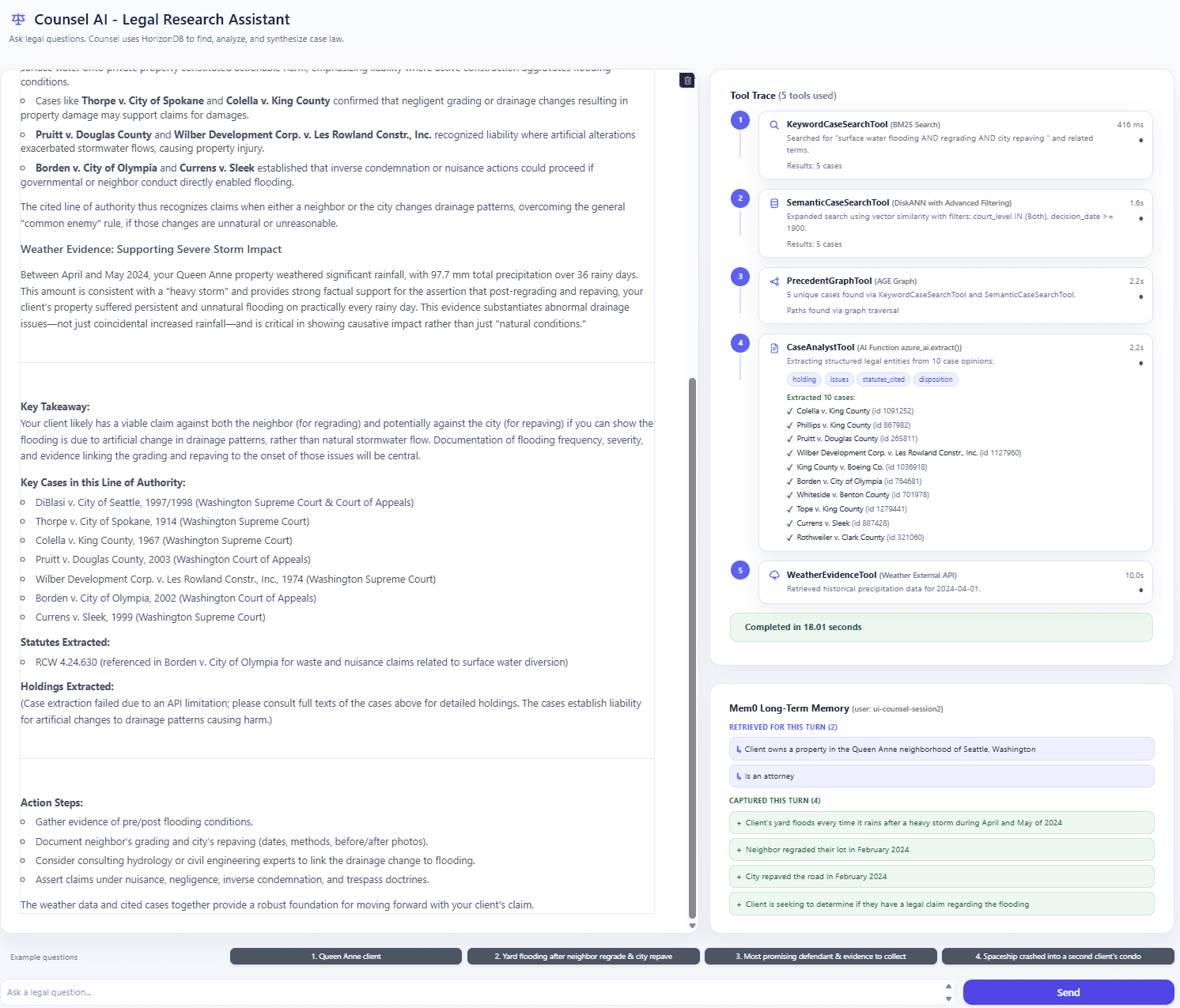
Microsoft Agent Framework connects the Azure OpenAI model to five tools. The agent picks the tools, supplies their inputs and uses the evidence they return to draft an answer — and every tool call is visible.
Architecture
How it fits together.
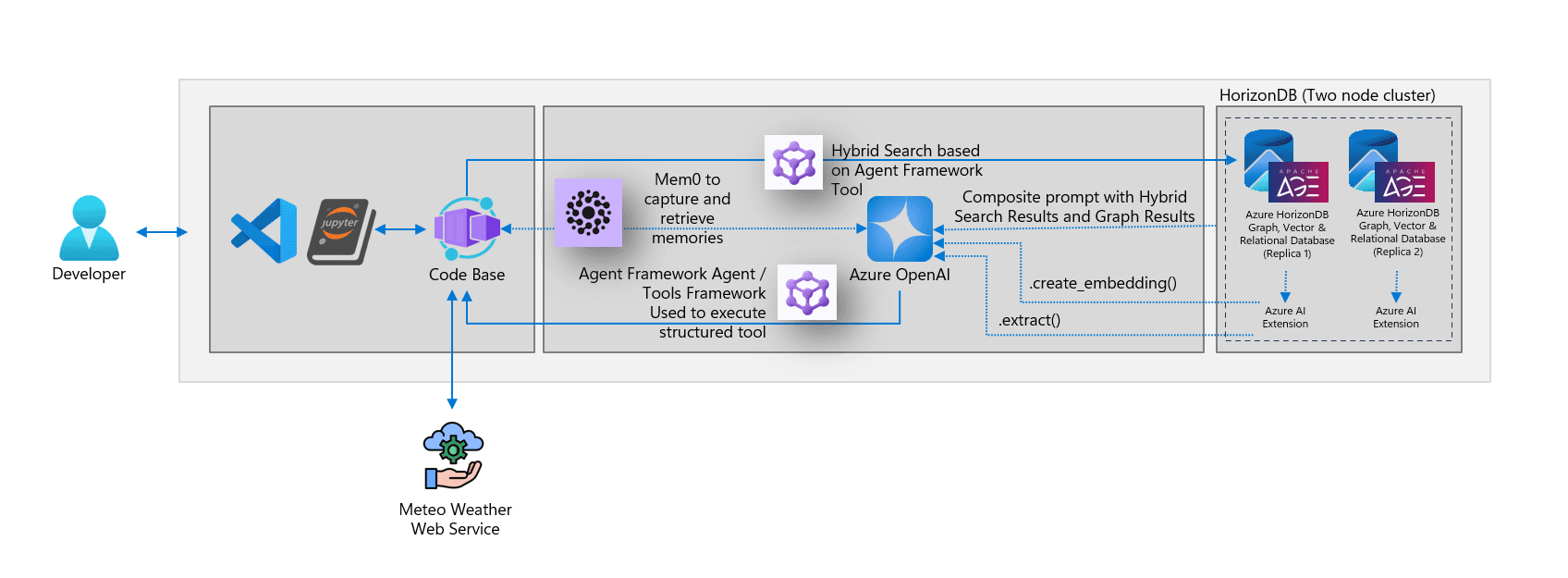
What gets built
Every capability, and what it does for the agent.
BM25 full-text search (pg_textsearch)
Finds opinions that match the relevant legal terms.
Vector search (pgvector + DiskANN)
Finds semantically similar cases, filtered by court and year.
Graph queries (Apache AGE)
Follows citations to related court decisions.
In-database AI (azure_ai.extract)
Calls Azure OpenAI from SQL to pull out rulings, issues, cited laws and outcomes.
External evidence (Open-Meteo)
Fetches historical rainfall for the place and dates in the question.
Long-term memory (Mem0)
Keeps selected facts in HorizonDB for later turns of the conversation.
Gradio chat app
Shows the conversation, every tool call and memory update side by side.
Step by step
The session, part by part.
Part 0 — Set up the Azure resources
Sign in to Azure and check the two resources the lab uses.
- 1Open the Azure portal and sign in.
- 2Select View all resources.
- 3Find the Azure HorizonDB cluster and the Azure OpenAI resource used in the lab.
Part 1 — Connect HorizonDB to VS Code
Use the VS Code extension for PostgreSQL to connect, explore and query the database.
- 1Open the lab folder in VS Code and review the .env file with the connection settings.
- 2Open the PostgreSQL extension (elephant icon) and choose Add Connection.
- 3Fill in the HorizonDB details, Test Connection, then Save & Connect.
- 4Open the connection Dashboard: wait events, disk I/O, transactions and storage.
- 5Open a New Query on the postgres database and run a first SQL statement.
Part 2 — Prepare the data (notebook 1)
Turn raw court cases into relational rows, vectors, indexes and a citation graph — all in one database.
- 1Load the Python libraries and read the connection settings.
- 2Enable the HorizonDB extensions: vector, pg_textsearch, age, pg_diskann, azure_ai.
- 3Register the chat and embedding models (lab-chat, lab-embedding).
- 4Load the court cases from CSV and check the rows.
- 5Add a vector column and generate an embedding for every opinion.
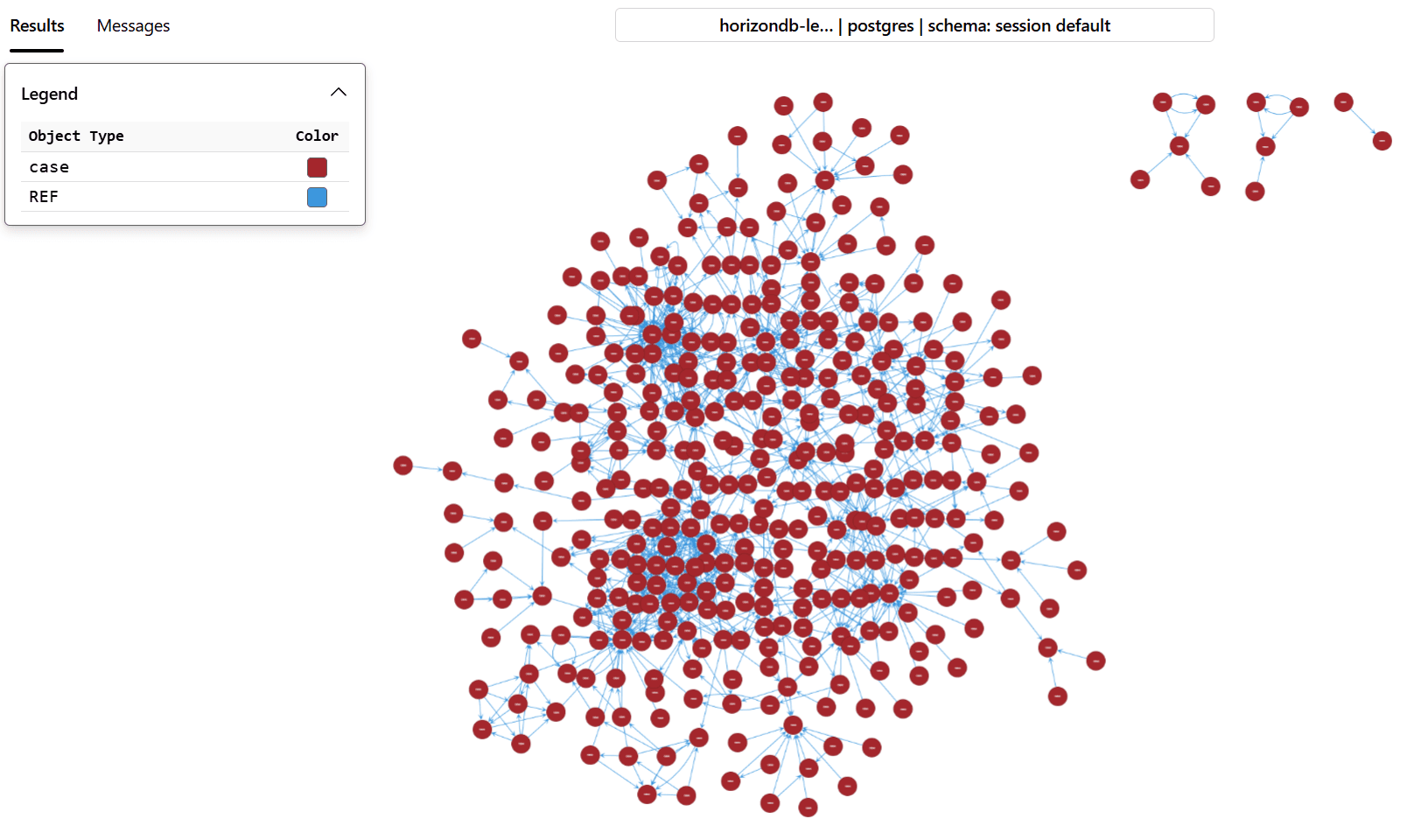
- 6Build the citation graph with Apache AGE (one node per case).
- 7Build and test the BM25 full-text index.
- 8Build the DiskANN vector index.
- 9Visualise the relational schema and the citation graph.
Part 3 — Build and try the agent (notebook 2)
Give the agent one tool at a time, compare the answers, then add memory, a chat UI and a failover test.
- 1Define the BM25 keyword search tool, test it, and give it to the agent.
- 2Add the vector search tool and compare BM25 and vector results — then use both (hybrid search).
- 3Add the Apache AGE graph tool to expand results with cited precedent.
- 4Add the in-database AI extraction tool so the answer includes extracted facts.
- 5Add the external weather tool and run the agent with all five tools.
- 6Add long-term memory with Mem0.
- 7Use the Gradio chat app and send four connected messages.
- 8Force a database failover and watch the app recover.
Run of show
- 00:00 – 02:00
- Introduction and overview
- 02:00 – 15:00
- The Caldova scenario and key concepts
- 15:00 – 70:00
- Hands-on lab steps
- 70:00 – 75:00
- Wrap-up and Q&A
Want this running on your own data?
We build it as a production-ready proof of concept inside your Azure tenant, as part of the AI Accelerator.
Scenario, steps and diagrams adapted from the Microsoft Frontier Tour 2027 lab ILL392 (© Microsoft, CC BY-SA 4.0). Sample data is a learning example, not legal advice. Source · License