What is Infrastructure as Code (IaC)?
Infrastructure as Code (IaC) is the practice of managing and deploying cloud infrastructure using code instead of doing it manually. It allows you to manage and provision compute infrastructure through machine-readable and usable files.
Predominant tools for IaC include Azure Bicep, Azure Resource Manager (ARM) templates, Terraform and more. IaC allows developers and admins to automate how resources are created, updated, and monitored. This removes manual management and provisioning, resulting in quicker, more reliable, consistent deployments across cloud environments.

“IaC involves using code to define the infrastructure that needs to be deployed in a descriptive model, similar to how code defines applications.”
What is Infrastructure as Code (IaC)?
Infrastructure as Code (IaC) is the practice of managing and deploying cloud infrastructure using code instead of doing it manually. It allows you to manage and provision compute infrastructure through machine-readable and usable files.
Predominant tools for IaC include Azure Bicep, Azure Resource Manager (ARM) templates, Terraform and more (we'll cover that later).
IaC allows developers and admins to automate how resources are created, updated, and monitored. This removes manual management and provisioning, resulting in quicker, more reliable, consistent deployments across cloud environments.
IaC lets you define Azure infrastructure (like virtual machines, networks, and storage) in templates. However, it is not limited to infrastructure (IaaS) parts — we can automate basically every other aspect of Azure resources. Think about PaaS services and serverless resources such as Azure Functions, Azure Logic Apps, or even access control policies, databases and database objects.
Benefits of Infrastructure as Code (IaC)
IaC is a practice where you manage and provision computing infrastructure using machine-readable definition files, instead of configuring physical hardware or using interactive tools. It offers several key benefits:
- Consistency — ensures that infrastructure deployments are consistent across all environments.
- Version Control — tools like Bicep and Terraform enable version-controlled infrastructure, allowing you to track changes, roll back versions, and collaborate effectively.
- Faster deployments — automating infrastructure deployment minimises recovery time, allowing businesses to respond to disruptions promptly.
- Reusability — whether for testing, development, or production, IaC promises consistency and efficiency across environments.
- Scalability — allows organisations to scale their infrastructure quickly and reliably with predefined templates.
- Automation — handles the entire infrastructure lifecycle, from provisioning to teardown automatically.
Infrastructure as Code and its role in Disaster Recovery (DR)
What happens if you have run out of backups or your backups do not work? If you have to rebuild loads of servers and deploy all the software, that is going to take ages.
But using Infrastructure as Code you can rebuild environments quickly. This is crucial for ensuring business continuity.
“If you have run out of backups or your backups do not work... having infrastructure as code means you can rebuild that environment super quickly.”
— Artan Ajredini — Founder/CEO AI Architect
How Does Azure IaC work?
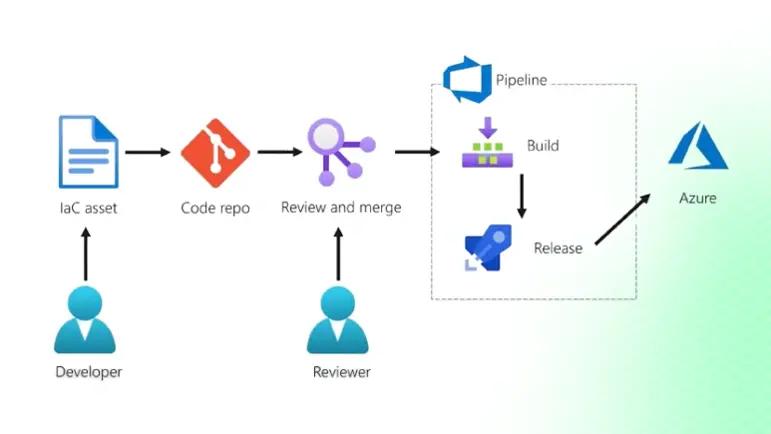
A typical IaC workflow in Microsoft Azure looks like this:
- A developer or operator writes the infrastructure definition in code using tools like Azure Bicep, ARM templates, or Terraform.
- They commit it to a source-code repository — Git.
- The change is reviewed and validated to check whether it is not malicious and does what it is intended.
- Once approved, the change is merged and sent through a CI/CD pipeline.
- The pipeline includes a build phase (tests, checks) and a release phase.
- The release phase actually creates the resources in Azure.
Build phase
In the build pipeline stage, developers write code and tests, which are then packaged into a deployable artefact that can be deployed across multiple environments.
The pipeline runs syntax checks and scans for secrets, credentials or misconfigurations and vulnerabilities.
If any issues are found, the pipeline can fail early. This way, unsafe assets are prevented from reaching the next phase: release.
Release phase
In the release phase, the pipeline authenticates to Azure using a service principal or managed identity. It retrieves secrets (e.g. passwords, cryptographic keys, certificates, connection strings) from Azure Key Vault. Instead of embedding secrets in files, you store them there.
Most IaC tools integrate well with Key Vault, allowing the pipeline to retrieve these secrets at runtime without enabling developers direct access to the secrets. This reduces the risk of secrets being misused or accidentally exposed.
Next, the IaC tool runs deployment commands and applies the configuration to the target Azure environment. Azure compares the desired state defined in the IaC code with the current state of your infrastructure.
If there's a mismatch, the IaC tool takes action – creating missing resources, updating existing ones, or removing anything no longer needed. This ensures that your environment remains consistent with what is declared in the code.
Azure IaC Tools
There are many tools for Infrastructure as Code. Which you use depends on your company's use case, needs, environment, and resources.
Azure Bicep
Azure Bicep is Microsoft's native IaC language. It is actively developed, fully supported, and integrates well with Azure tooling. It is a domain-specific language (DSL) built to simplify ARM templates — declarative, readable, and seamlessly integrated with Azure.
param location string = 'East US'
param storageAccountName string = 'mystorageaccount'

resource storageAccount 'Microsoft.Storage/storageAccounts@2022-09-01' = {
  name: storageAccountName
  location: location
  kind: 'StorageV2'
  sku: { name: 'Standard_LRS' }
}
Azure Resource Manager (ARM) Templates
ARM templates are JSON-based and used to define Azure resources declaratively. They provide deep integration with Azure but can be complex to write and maintain. Bicep was introduced as an abstraction over ARM templates to simplify the experience.
{
  "$schema": "https://schema.management.azure.com/schemas/2019-04-01/deploymentTemplate.json#",
  "contentVersion": "1.0.0.0",
  "resources": [{
    "type": "Microsoft.Storage/storageAccounts",
    "apiVersion": "2022-09-01",
    "name": "mystorageaccount",
    "location": "East US",
    "sku": { "name": "Standard_LRS" },
    "kind": "StorageV2"
  }]
}
Terraform

Terraform is cloud-agnostic — it allows you to define infrastructure across multiple providers, not just Azure. It uses HashiCorp Configuration Language (HCL), which is easy to learn. If you work in multi-cloud environments, Terraform is a strong option. OpenTofu is also worth looking at as a fully open-source alternative governed by the Linux Foundation.
provider "azurerm" {
  features {}
}

resource "azurerm_storage_account" "storage" {
  name                     = "mystorageaccount"
  resource_group_name      = "myResourceGroup"
  location                 = "East US"
  account_tier             = "Standard"
  account_replication_type = "LRS"
}
Pulumi

Unlike Bicep and Terraform, Pulumi allows you to write infrastructure in general-purpose programming languages like Python, TypeScript, and C#. This makes it appealing to developers who prefer imperative coding, though it requires more programming knowledge.
import * as azure from "@pulumi/azure";

const storageAccount = new azure.storage.Account("storage", {
  name: "mystorageaccount",
  resourceGroupName: "myResourceGroup",
  location: "East US",
  accountTier: "Standard",
  accountReplicationType: "LRS",
});
How do I Choose the right IaC tool?
Before selecting a tool, ask yourself and your team:
- Do you have any existing experience with a specific IaC tool?
- What programming skills does the team already have? (C#, Go, JSON, TypeScript — or none?)
- Which cloud provider are you using?
- What is your deployment mechanism?
- What are the compliance requirements of your organisation?
- Do you need an imperative or declarative approach?
- Who will manage the IaC templates, and where will they live?
- Are you managing configuration too, or just provisioning infrastructure?
Check supported languages in your environment
Before selecting an IaC language, verify what your environment supports. Check official documentation — Azure officially supports Bicep, Terraform, Pulumi, and ARM templates. Review policy and compliance requirements, examine existing infrastructure, and experiment in a test environment to see which language aligns best with your workflow.
Choose the right language
The choice of an IaC language depends on your cloud provider, work environment, and personal preferences. Once you know what your environment supports, decide on the best fit based on your organisational needs and research how to get started.
10 Azure IaC Best Practices
Starting may seem overwhelming, but breaking it down into manageable steps will make it easier. Here are the 10 best practices to help you get started successfully:
1. Set up your development environment
Install the necessary tools and CLI for your chosen IaC language. Ensure you have access to an Azure subscription. Use Visual Studio Code with extensions such as the Bicep Extension, Terraform Extension by HashiCorp, or Pulumi Extension to improve syntax highlighting, autocompletion, and deployment capabilities.
2. Learn from official resources
Microsoft provides excellent learning resources for Bicep via Microsoft Learn. Terraform and Pulumi also offer extensive documentation and hands-on labs. Invest time in these before going to production.
3. Start with simple deployments
Start with small resources, such as deploying a storage account. Test your scripts in a sandbox environment before deploying to production. Follow best practices such as using parameters and modular structures, and explore Azure Verified Modules which support both Bicep and Terraform.
4. Use version control
Store your IaC files in GitHub, Azure DevOps, or another version-controlled repository to maintain detailed change histories and support rollback capabilities. This gives you a 4-eyes principle before changes reach production, mitigating mistakes.
5. Test and validate
Regular testing of IaC scripts is paramount. Ensuring scripts perform as expected before deploying to production can prevent potential issues that could impact business operations.
6. Avoid configuration drift
Avoiding drift is key to reliable infrastructure. By removing direct human access and routing all changes through your CI/CD pipeline, you ensure that Infrastructure as Code remains the single source of truth.
7. Automate
Automation eliminates manual steps, reduces errors, and enables consistent reproduction of environments. Implement CI/CD pipelines (e.g. Azure DevOps, GitHub Actions) to automate deployments across all environments — development, test, staging, and production.
8. Parameterise your IaC templates
Define all environments using the same IaC template, and vary only the input parameters (e.g. scale, region, resource SKUs). This keeps your infrastructure consistent across environments, avoids configuration drift, and ensures tests in lower environments are valid and representative of production.
9. Limit access to the production environment
Having people change things manually in production may cause your IaC to break. Restrict write access to production environments. For urgent changes, use Privileged Identity Management (PIM) for just-in-time access with time limits and audit logs, or break-glass accounts stored securely for genuine emergencies.
10. Manage and store secrets in the right place
Never store hard-coded secrets in your IaC code files. Instead, store and manage secrets in Azure Key Vault — a secure and centralised place that integrates natively with all major IaC tools.
Want us to implement IaC for your Azure environment?
Book a free call and we will walk you through the right setup for your team.
Closing thoughts
Infrastructure as Code is no longer optional for teams running workloads in Azure. It is the foundation of reliable, repeatable, and auditable infrastructure. Whether you choose Bicep for Azure-native simplicity, Terraform for multi-cloud reach, or Pulumi for developer-first workflows — the key is to start, iterate, and automate.
Begin with a single resource, put it in version control, run it through a pipeline, and build from there. The 10 best practices in this guide give you the foundation to do it right from day one.